
Practice Management Software Built for
Canadian Accountants
You know how when you go to a software product’s websites and you scroll from the top to the bottom of their main page and you read lots of wonderful buzzwords about the business advantages of their product but after you finish scrolling through the main page, you realize you still have no idea how the software really works and you’re left feeling more perplexed than informed...
We are going to start our website by proving we are different, and we that truly understand what Accounting Professionals are looking for in a complete practice management system by clearly showing you how our system works and why it adds superior value.
Our Story
We are a group of people that have worked in the accounting industry with various backgrounds. We developed Fusion Workflow because we were disappointed with the practice management product offerings currently available. Some are decent, but very expensive, others seem to have missed the idea of how accounting deadlines really work in the real world.
Here’s how our Fusion Workflow works and why it uniquely solves the issues that Accounting Professionals face.
Projects
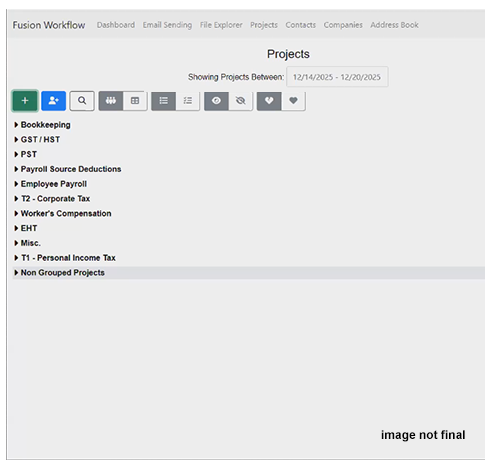
The first building blocks of our system is our Projects. Our projects represent each engagement which could be client bookkeeping job, it could be a GST/HST filing, it could be a payroll remittance, or it could be a T2 corporate tax.
Our Advantages
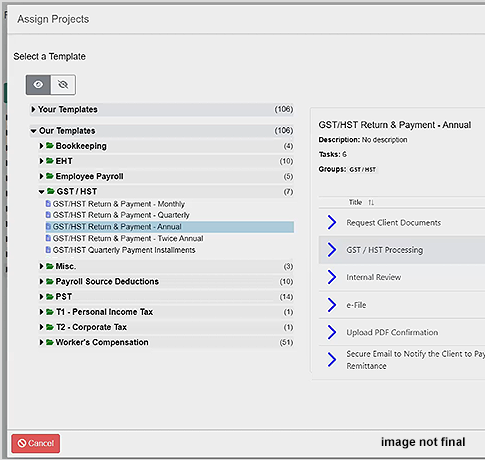
- We have already built-in default project templates for over 100 Canadian filing deadlines for all the federal and provincial filing and remittance deadlines, thus saving you dozens of hours in the implementation setup.
- You have the ability to create and save your own recurring project templates based on any kind of a repeating pattern you like (including the client’s year end date). You can use our templates as a starting point to customize your own.
- Unlike most other task management systems, our projects recur automatically, regardless of whether the previous project have been completed so you don’t miss any future project deadlines if a previous project gets delayed.
Tasks
The project is composed of a sequence of Tasks and each of those Tasks are either assigned to the clients or they are assigned to internal team members. The Tasks are the true building blocks of our system and the Tasks are assigned to clients and team members to allow everyone to work on the right Tasks at the right time so the Projects themselves progress smoothly
Our Advantages
- Our Tasks allow you to focus the right team members to work on the right part of the project at the right time, so that you can delegate the work efficiently across of your team members.
- The Tasks are done in sequence; which means that a Task will be assigned to an internal team member only after, for example, a client has finished uploading all of their documents. This solves the problem of team members no longer needing to waste time trying to investigate what they need to work on based on which clients have submitting their required documents – our system specially handles this – AND our system can repeatedly remind the client until the documents are submitted!
- You can schedule tasks to be due relative to the beginning of the project start, or the project end due date so that all the individual Tasks due dates are scheduled correctly, regardless of the number of days in the month (i.e. accounting for Feb 28 short months).
Here is a sample GST/HST Project that shows how the Tasks would work:
View Sample GST/HST Project| Task | Description | Relative Due Date |
|---|---|---|
| Request Client Documents | Client logs into their own portal to upload the requested documents. You can request a specific list of documents or just generically request documents that the client knows to upload. | Due: 5 days after project start |
| GST / HST Processing | An internal task assigned to a team member with the requisite skills to do this GST/HST processing work. | Due: 10 days before project end |
| Internal Review | An internal task assigned to a team member with the requisite skills to do this review. | Due: 6 days before project end |
| e-File | An internal task assigned to a team member with the requisite skills to do this admin e-Filing. | Due: 4 days before project end |
| Upload PDF confirmation | An internal task assigned to a team member to upload the GST/HST return confirmation PDF document to the client’s portal and to file it internally. | Due: 3 days before project end |
| Secure Email to Notify the Client to Pay Remittance | A final step to send a predefined email to the client where the team member simply needs to type the amount the client needs to pay as a notification to the client. | Due: 3 days before project end |
Steps
The tasks themselves have steps within them. The steps are simply different action items that allow you to efficiently guide your team members and clients with specific predefined actions within each Task that they need to complete.
Running an efficient accounting professional office means that you need your team members to work quickly, efficiently and most importantly without mistakes! Preventing mistakes is all about guiding your team members to do the correct steps consistently for each unique client and automating as much of the processes as possible.
Our steps can be action items to include, for example, a Standard Operating Procedure to a Task, or to add checkmark lists, or request specific documents from clients, or to send secure email to a client based on a predefined template already saved, or to request signatures on documents, etc.
You can have multiple steps with a single Task to guide the whole process of how that task should be completed so the task can be done very quickly and consistently, every single time, no matter which team member is working on that Task.
These are the different current step items that are available:
Internal Steps for Team Members
- Standard Operating Procedures (coming soon)
- Checkmark
- Upload File to Client’s Portal (i.e. Filing confirmation receipt)
- If 'Yes/No', then... (coming soon)
- Webhook
Client Action Steps
- Send Secure Email
- Send Document Request
- Send Secure E-Signature
- Client Approval Request
- Client Survey Request
So now let’s look at how this all comes together for a T2 Project:
View Sample T2 Project| Task Name | Step Name | Step Type |
|---|---|---|
| Engagement Letter |
Request Authorization Sign Engagement Letter Upload Eng. Ltr to Client Portal File Eng. Ltr Internally |
Client Approval Request Send Secure e-Signature Upload File Checkmark |
| Intake Questionnaire | Client Discovery Questionnaire | Client Survey Request |
| Request Client Documents | Client Document Request | Send Document Request |
| T2 Processing |
Internal SOP Documentation Confirm Filing Deadlines Review Prior Year T2 Import/Enter TB Adjusting Entries Reconcile Key Accounts Book Dividends/Bonuses Manage Assets and Inventory Update the fixed asset register CCA (Schedule 8) Inventory Count & Valuation Schedule 1 Small Business Deduction GRIP / LRIP Loss Carryforwards RDTOH & Part IV Foreign Reporting Shareholder Loans Related Party & Association Schedule 100: (Mandatory) Schedule 125: (Mandatory) Schedule 141: (Mandatory) Schedule 4: (if Applicable) Schedule 9/23/28: (if Applicable) Schedule 50: (if Applicable) Schedule 88: (if Applicable) Form T106:(if Applicable) Prepare Final Return If Payroll > 1Million, then EHT If Capital Gains, then T5 |
Standard Operating Procedures
Checkmark Checkmark Checkmark Checkmark Checkmark Checkmark Checkmark Checkmark Checkmark Checkmark Checkmark Checkmark Checkmark Checkmark Checkmark Checkmark Checkmark Checkmark Checkmark Checkmark Checkmark Checkmark Checkmark Checkmark Checkmark Checkmark Checkmark If 'Yes/No', then If 'Yes/No', then |
| Internal Review | Internal Review | Checkmark |
| Client signature on T183 |
Prepare draft for client approval
Send Draft Return for T183 Signature Internally File T183 |
Checkmark
Send Secure Email Send Secure e-Signature Checkmark |
| e-File |
e-File T2
Confirm CRA Acceptance |
Checkmark
Checkmark |
| Upload PDF & Send To Client |
Prepare Final Package
Upload T2 PDF to Portal for Client |
Checkmark
Checkmark |
| Finalize & Archive | Archive File | Checkmark |
Task Management
(the part we are really proud of)
Up to now, with the recurring Projects, Tasks and Steps; this is all pretty straightforward stuff. We’ve solved a few problems above that really works for accounting professionals that other task management software struggled with. Our Step automation allows your team members to be able to work quickly and efficiently because we automate many time consuming tasks like typing repetitive emails and making sure no steps get forgotten.
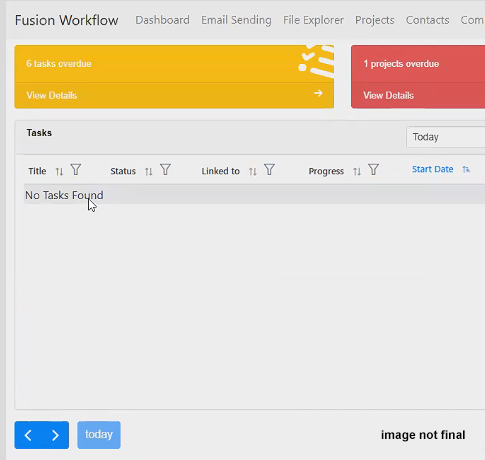
But the real bane of every manager in an accounting office is the Task Management! It’s one thing to have a great system like ours that creates all the recurring Tasks correctly so no deadlines gets missed – It’s something completely different to make sure that ALL of these hundreds (sometimes thousands) of Tasks over the year are actually being assigned to the right person, at the right time so that everything gets completed on time!
It is with this Task Management problem that we have put all our collective accounting and technological experience together to create a product that adds true value for managing Professional Accounting offices.
Try It Today — Risk Free
The future of Canadian practice management starts here.
Come see what three years of focused development and real-world experience can deliver.
FUSION WORKFLOW — charting a smarter course for Canadian accounting firms.


